How to use JTervals
On this page
1 What JTervals is
JTervals is a simple interval and paced-run timer for Apple Watch. There is no iPhone app to open: you set up and run everything on the watch, and each workout you save goes into Apple Health and the Fitness app.
Pick one of three modes from the first screen:
| Mode | You set | What it does | Saved to Health as |
|---|---|---|---|
| Intervals | Active, Rest, Total (minutes) | Repeats Active and Rest sets for the total time and counts them down. Total 0 keeps going until you stop. | Outdoor Run, with distance and route |
| Trainer | Active, Rest, Sets, Group rest, Groups | Groups of sets with a longer rest between groups. One group per exercise, for circuits at home or in the gym. | Indoor HIIT (no distance or map) |
| Paced | Run / Walk (minutes), Pace per mile or km | One run or walk at a target pace. Once a minute it taps you if you are too fast or too slow. | Outdoor Run, with distance, route and splits |
Every mode can start with a warm-up and end with a cool-down. Every change has its own tap and beep, so you never need to look at your wrist.
2 Before your first workout
What you need. An Apple Watch Series 6 or later, an SE (2nd generation) or any Ultra, running watchOS 11 or later. Install JTervals from the App Store; it is a watch-only app, so nothing is added to your iPhone's Home Screen.
First launch: Health. The first time you open JTervals it asks to read your heart rate, calories and distance, and to save workouts and routes. Allow all of them. If you decline, the timer still works, but you will see no heart rate or calories and nothing is saved to Health.
First Start: Location. The first time you start an Intervals or Paced workout the watch asks for your location. Allow it while using the app: it gives you your pace, your distance and the route map in Fitness. Trainer never asks. If you decline, everything still works as a timer, just without pace, distance or a map.
The first screen. The mode list has Intervals, Trainer and Paced at the top, then the Log, and How to use and Settings at the bottom.
Miles or kilometres. Units, in Settings or on the Paced setup screen, sets mi or km for the whole app. Switching converts your target pace, so your speed stays the same.
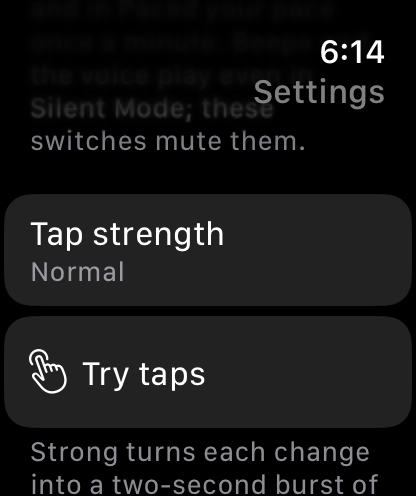
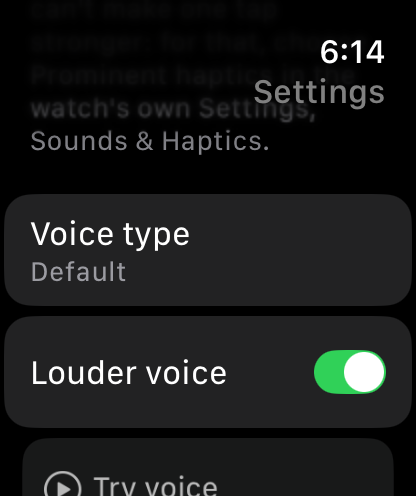
Settings. Under How to use at the bottom of the mode list: the Beeps, Haptics and Voice switches, Tap strength (Light, Normal or Strong) with a Try taps button, Voice type (Default, Female or Male), Louder voice (on to start with; it lifts the speech to cut through street noise) with a Try voice button, and Units. Beeps and Haptics are on to start with; Voice is off.
3 Intervals
Intervals is for work-and-rest sets for a set time: sprints, Tabata, EMOM, or any on-off session.
Set it up. Warm-up (3:00 to start with, 0:00 for none), Active (45 s), Rest (15 s), Total in minutes (20), Cool-down (3:00). The line under Start tells you how many sets fit and how long the workout will be. Set Total to 0 min to keep going until you stop.
What happens. Warm-up, then a 5-second countdown, then Active and Rest sets until the total time is up. The last rest is skipped, the cool-down starts on its own, and the workout ends.
On the screen. The phase name (ACTIVE in green, REST in orange), the big countdown for this phase, the set line ("Set 7 of 20") with your distance so far on its right, then the time left and your heart rate. Tap any of the small readings to see it big for a few seconds.
Saved as an Outdoor Run with your distance and GPS route, so it shows on a map in the Fitness app.
4 Trainer
Trainer is for circuits at home or in the gym: groups of sets with a longer rest between groups, one group per exercise.
Set it up. Warm-up, Active, Rest, Sets per group (3 to start with), Group rest (1:00), Groups (5), Cool-down. The line under Start shows the shape, for example "5 × 3 sets · 17:45".
What happens. Warm-up, countdown, then for each group: Active, Rest, Active, Rest, Active, then the group rest. The group rest replaces the last short rest of the group. After the last group the cool-down starts, then the workout ends.
On the screen. The phase name (ACTIVE, REST, or GROUP REST in blue), the countdown, and the set line with the group: "Set 3 of 3 · Group 1/5". Tap the set line to see the set and group big.
Indoors. Trainer never asks for your location and shows no distance. It is saved to Health as an indoor HIIT workout, with your heart rate and calories but no map.
5 Paced
Paced is one run or walk at a target pace. The watch compares your last minute with the target and taps you when you drift.
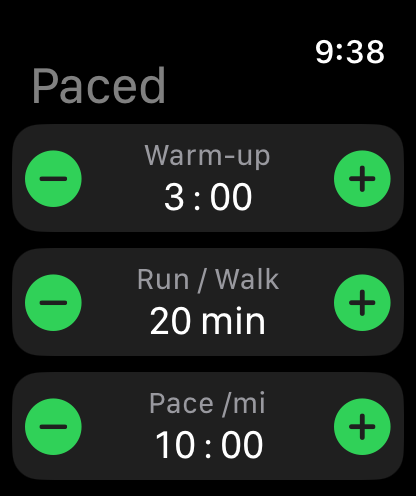
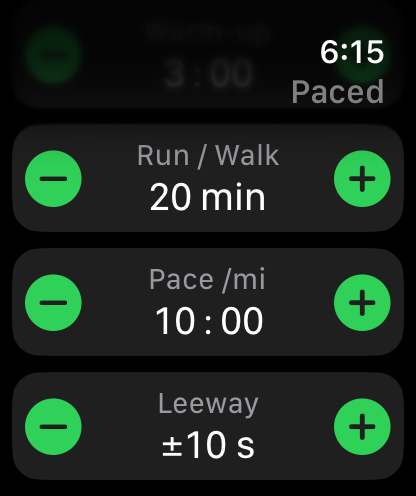
Set it up. Warm-up, Run / Walk in minutes (0 for until you stop), Pace per mile or km (10:00 to start with; anything from 2:00 to 30:00), Leeway (how many seconds either side of the pace still count as on pace; 10 s to start with, 1 to 90), Units (mi or km), Cool-down. The line under Start shows the distance that works out to, for example "20:00 at 10:00 /mi ≈ 2.0 mi".
On the screen. Your target on the top line, then the verdict: RUN / WALK until the first reading, then ON PACE (green), TOO FAST (blue) or SPEED UP (orange). Below that your pace over the last minute, big. Then the distance so far and the pace of your last full minute, then the time left and your heart rate. Tap the pace to see it big with the target; tap the distance to see it big with your last mile or km split.
The taps. Once a minute, if you are off pace: two heavy bursts mean ease off, three rising bursts over about three seconds mean speed up. On pace means within your Leeway of the target, 10 seconds either side to start with. Each full mile or km done gets a single tap. Standing still or indoors you will get SPEED UP once a minute; that is expected.
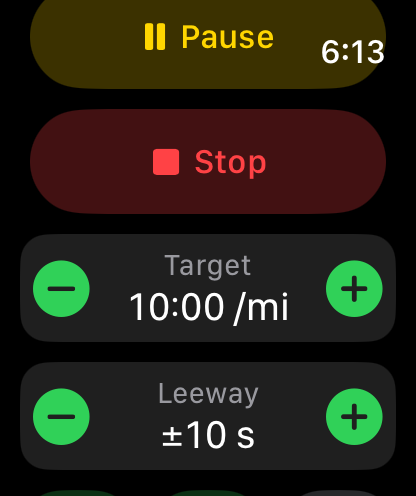
Change the target or the leeway mid-run. Swipe right and use the Target − / + row (15 seconds a tap) or the Leeway row under it (5 seconds a tap). The verdict updates at once, and both are kept for next time.
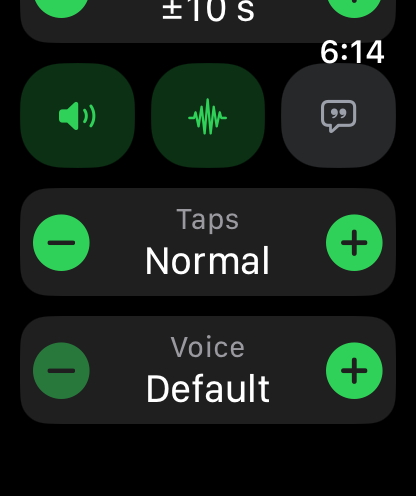
Voice. Switch Voice on in Settings, or with the speech-bubble button on the swipe-right page. Once a minute, after the taps, your watch says your last minute's pace and the verdict: "9:45, on pace", "Speed up. 10:40" or "Slow down. 9:10", and each mile or km as you pass it: "Mile 2, 9:58". It plays through the watch speaker or headphones connected to the watch. Voice stays off until you switch it on.
Afterwards. The finish screen and the Log list your splits (one line per mile or km) and the pace of every minute. Saved to Health as an Outdoor Run with your route.
6 Setting up a workout
Each setting is a block with − and + either side of the number. Scroll down for the rest of them and the Start button at the bottom.
- Tap a number to select it. It gets a green border. Turn the Digital Crown, or use − / +, to change just that number. Times are two numbers: tap the minutes or the seconds separately.
- Tap it again to release it. With nothing selected, the crown scrolls the page.
- Press Start. The line under Start sums up what you have set.
Your settings are remembered for each mode, so next time you only press Start.
What zero means
| Setting | 0 means |
|---|---|
| Warm-up or Cool-down 0:00 | None |
| Rest 0:00 | No rest between sets |
| Total or Run / Walk 0 min | Keep going until you stop. Swipe right for Cool down or Stop. |
7 During a workout
The timer screen is big and colour-coded, so a glance is enough.
| Phase | Colour | What you feel |
|---|---|---|
| WARM UP | Purple | A double tap when it ends and the countdown starts |
| GET READY (5 s countdown) | Yellow | One tap per second |
| ACTIVE or RUN / WALK | Green | A "go" tap and beep at the start |
| REST | Orange | A "rest" tap and beep |
| GROUP REST | Blue | Its own tap and beep (Trainer only) |
| COOL DOWN | Purple | Its own tap and beep; a final one when the workout ends |
The last five seconds of every phase tick once a second on your wrist, so you know a change is coming without looking.
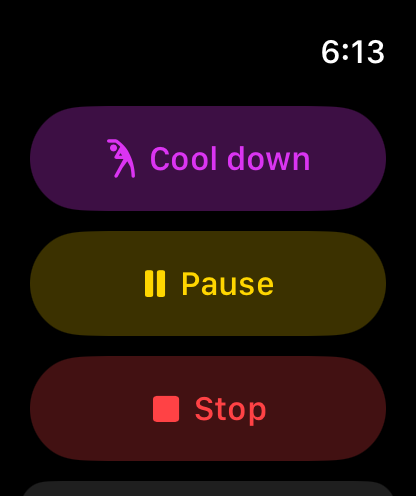
Swipe right for the controls. From the timer, swipe right to reach:
- Skip warm-up, shown during the warm-up: jumps straight to the countdown.
- Cool down, shown once the sets have started: ends the sets early and starts your cool-down. In an open-ended workout this is how you finish.
- Pause and Resume. The timer freezes and the screen says PAUSED.
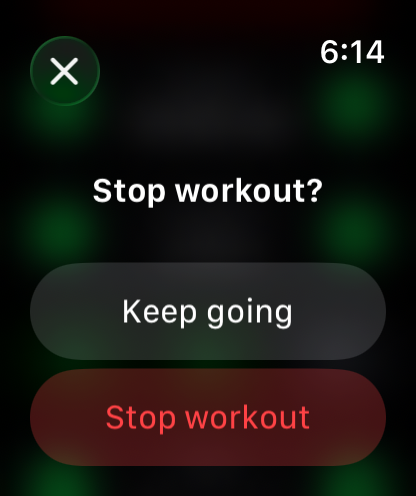
- Stop. It asks "Stop workout?" first; tap Keep going to carry on or Stop workout to end it.
- Target − / + in Paced mode, 15 seconds a tap, with a Leeway − / + row under it, 5 seconds a tap.
- Beeps and Haptics buttons, and a Voice button: the same switches as in Settings. Under them, Taps (Light, Normal or Strong) and Voice (Default, Female or Male) rows with − / +, in every mode; changing Taps plays a tap at the new strength. They take effect from the next cue.
The controls page swipes back to the timer on its own at the next phase change.
See a reading big. Tap your heart rate, the set line, the distance, the time left or (in Paced) the pace, and it fills the screen for five seconds. Tap again to go back sooner.
Voice. With Voice on, your watch names each phase as it starts: "Warm up", "Get ready", "Set 7 of 20", "Rest", "Group rest", "Cool down", and "Done" at the end. In Paced it also gives your pace once a minute. Choose a Default, Female or Male voice in Settings or on the controls page. Louder voice, on to start with, lifts the speech to cut through street noise; switch it off in Settings if the voice sounds harsh.
Beeps, taps and voice. Beeps and the voice play through the watch speaker, or through headphones connected to the watch, and your music dips while they play. They sound even when the watch is in Silent Mode, so you can keep the watch quiet for everything else. To mute them any time, switch Beeps or Voice off in Settings or on the controls page. Haptics can be switched off the same way.
8 Finishing, Health and the Log
Workout Ended. When the cool-down finishes, or you tap Stop, the finish screen comes up at once and shows Time, Sets (Intervals and Trainer) or Distance and Pace (Paced), Distance (Intervals), Active kcal and Avg HR. Choose Save or Discard. Save says Saving… for a few seconds while Health writes the workout. In Paced mode your splits and the pace of every minute are listed under the buttons; scroll down.
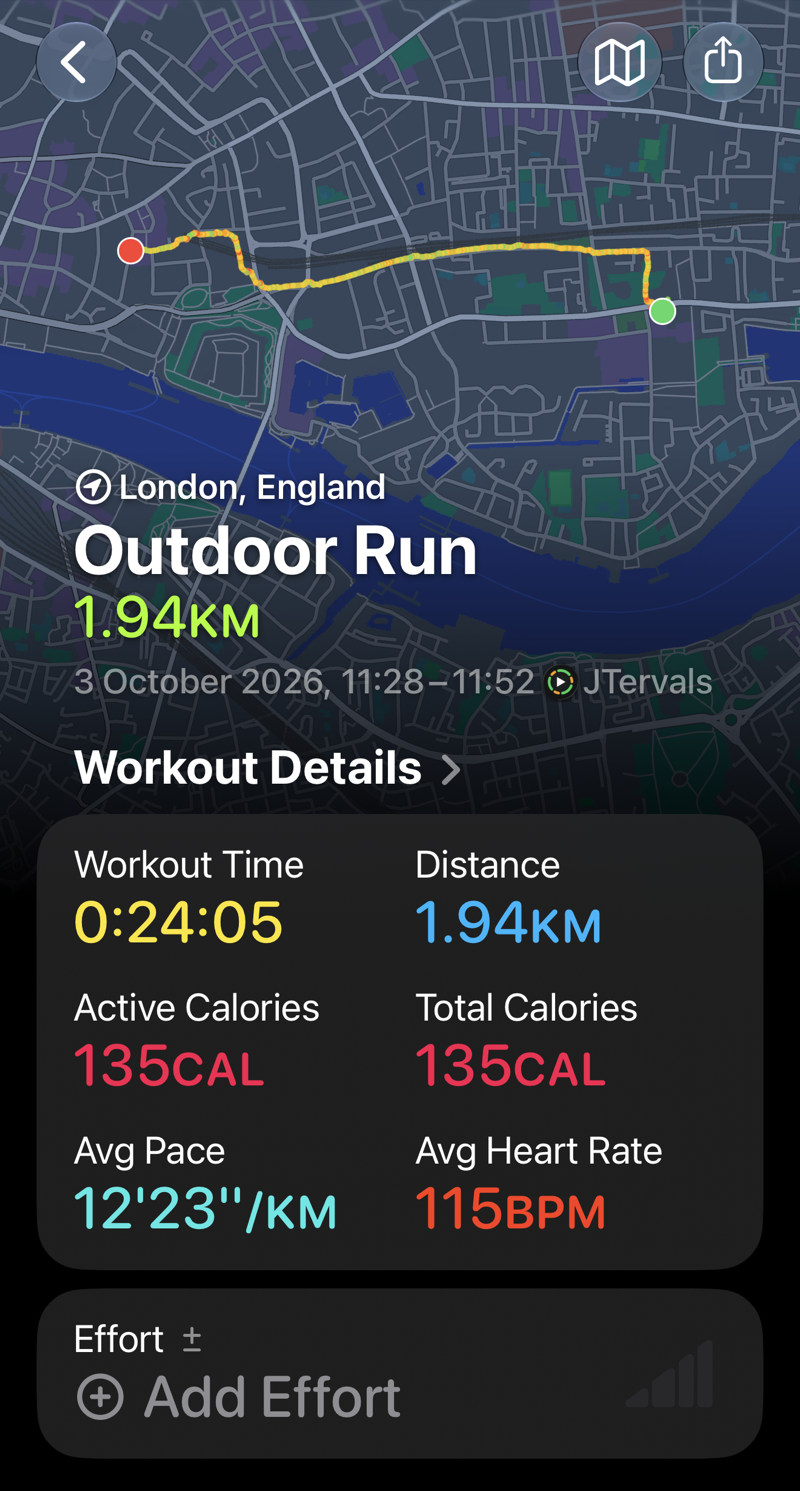
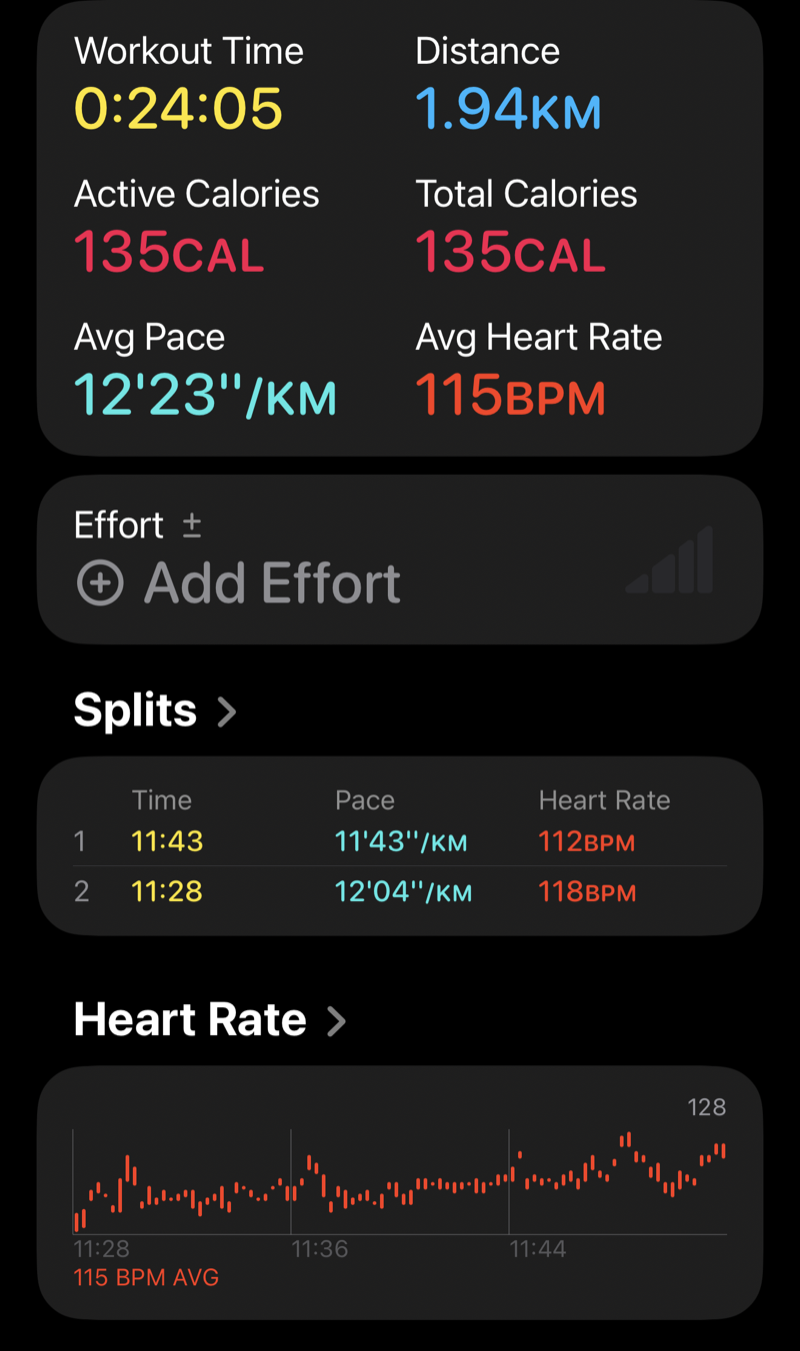
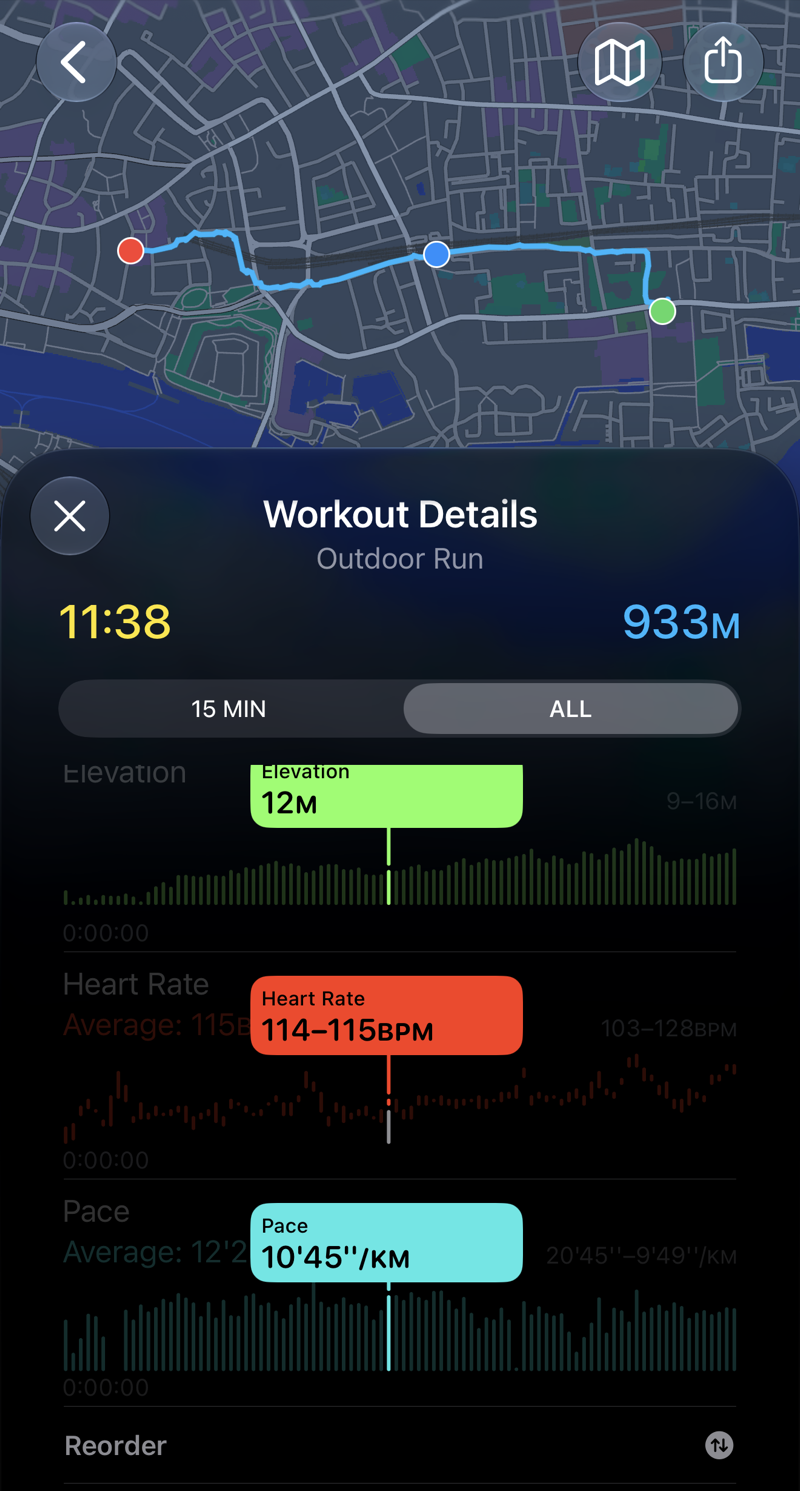
Saved to Health. Save writes the workout to Apple Health and shows a Saved screen with the same figures. Tap Done to go back to the mode list. Intervals and Paced workouts appear in the Fitness app as Outdoor Runs with your heart rate, calories, distance and the route on a map, plus your Splits per mile or km and a pace chart under Workout Details that you can scrub through. Trainer sessions appear as indoor HIIT. All of them count toward your Activity rings.
The Log
Every workout you save is also kept in the Log on the mode list, newest first, with a line such as "Sat 3 Oct · Paced" and "3.02 mi · 9:56 /mi". Discarded workouts are not logged.
- Open an entry to see the finish-screen figures, the target and splits and minutes for Paced, and two buttons: Share sends it as text through Messages or Mail; Delete removes it after asking.
- Swipe left on a row to delete it from the list.
- Clear log at the bottom removes every entry, after asking.
- The Log keeps the last 100 workouts. Health keeps everything you save.
9 Tips and troubleshooting
| If | Then |
|---|---|
| No pace, distance or map | Location was declined. On the watch go to Settings, Privacy & Security, Location Services, JTervals, and choose While Using the App. Trainer never shows distance; that is by design. |
| The pace says RUN / WALK or SPEED UP for the first minute | Normal. The pace is measured over your last minute, so the first verdict takes about a minute, longer under tree cover or between buildings. |
| SPEED UP every minute indoors or on a treadmill | Expected. Paced needs GPS, so use it outdoors. Indoors, use Intervals or Trainer. |
| Heart rate or calories show -- | Health access was declined, or the watch is loose. On the watch go to Settings, Health, Apps, JTervals, and allow everything. The timer works either way. |
| The workout is not in Fitness | Health write access was declined (see above), or you tapped Discard. The Log on the watch still has it if you saved. |
| You cannot hear the beeps | Check the Beeps switch in JTervals' Settings (Silent Mode does not affect the beeps), and the watch volume under Settings, Sounds & Haptics. Taps still work with beeps off. |
| You cannot feel the taps | Check the Haptics switch, set Tap strength to Strong in JTervals' Settings (a two-second burst; Try taps lets you feel it), and choose Prominent haptics under the watch's own Settings, Sounds & Haptics. |
| You tapped Stop by mistake | Nothing has ended yet. Tap Keep going. |
| The workout has no end (Total or Run / Walk 0) | Swipe right and tap Cool down to wind down, or Stop to finish now. |
| The crown will not scroll the setup page | A number is selected (green border). Tap it to release it. |
| Your wrist was down for a while | The timer runs on the clock, not the screen, so the countdown is right when you raise your wrist. |

Still stuck?
Questions about JTervals: JonnyP Industries LTD, info@jonnyp-industries.com.
info@jonnyp-industries.com© 2026 JonnyP Industries LTD. JTervals is a product of JonnyP Industries LTD. All rights reserved.